

Op Login separates playing as an operator from using operator privileges. An operator joins in a locked state, authenticates when administrative access is needed, and can return to a protected state without leaving the server. The plugin adds authentication, session controls, and command auditing around that workflow.
- Installed on
- The server
- Authentication
- Password or PIN
- Session control
- Manual & timed
- License
- MIT
Join locked. Unlock when needed.
Operators begin in a locked session, so administrative privileges are unavailable until authentication succeeds. They can still use the commands the server allows while locked.
Sensitive command protection takes priority over whitelist mistakes for high-risk commands. Administrators can also enable automatic locking after sensitive operations and use an emergency lockdown to lock online operators together.
Join in the protected state.
Operator privileges are locked on join, while normal gameplay remains available.
Authenticate for admin access.
Use /oplogin to start the configured password or PIN flow.
Lock access again.
Use /oplogout, allow an unlock timeout to expire, or apply the configured automatic locking behavior.
Password mode or a PIN keypad.
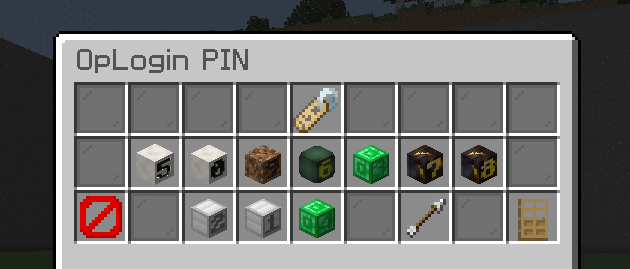
Password mode is the default. The /oplogin command starts authentication, and the next chat message is captured privately as the password. The optional PIN mode uses an in-game keypad with randomized digit positions and custom number heads.
| Mode | How it works |
|---|---|
| Password | Uses the privately captured next chat message and the configured minimum password length. |
| PIN | Uses a randomized keypad. Stored credentials must be numeric and match the configured PIN length. |
Control how long a session stays unlocked.
Unlock timeouts limit the duration of an authenticated session. Failed login attempts are tracked and can lead to temporary blocking, while operator command auditing records administrative activity.
Credentials are stored using BCrypt, with migration support for older AES-encrypted entries. Trusted-IP auto-login is available, but the IP is remembered only after a successful authenticated login. Using /oplogout locks the session and clears that operator's remembered trusted-IP state.
The operator command reference.
Session commands are used in game. Credential management, reload, and emergency lockdown commands are documented as console-only.
| Command | Where | Action |
|---|---|---|
/oplogin | In game | Start password authentication or open the PIN keypad. |
/oplogout | In game | Lock the session and clear trusted-IP login state. |
/opsetpass <player> <password> | Console | Set or replace an operator credential. |
/resetop <player> | Console | Remove an operator credential. |
/opreload | Console | Reload configuration and whitelist data. |
/oplockdown | Console | Force online operators back into a locked state. |
Install and configure on your server.
Download the plugin release that matches your server, place its JAR in plugins, and start the server once to generate config.yml and whitelist.yml. Configure the settings before using the authentication workflow.
config.yml holds the authentication mode, minimum password length, attempt limit, temporary block duration, unlock duration, trusted-IP option, and join-locking behavior. whitelist.yml lists commands that remain available while locked, except for sensitive commands that are always protected.
Read the original documentation and check individual files for release-specific requirements.
Modrinth documentation & releasesSource & issue tracker